 AI Host Assistant
Docs · Guide 13 of 14
Multicalendar, year view · “Signals”
Booking pace
Is demand still coming in at your usual pace? It counts net nights over the last 30 days by the day they were booked, compares them with your usual range, and tells you whether your wait since the last booking is normal for you.
- Where
- Your multicalendar on Airbnb, in the year view: the “Signals” button, “Status” tab. Booking pace is the first block.
- What it reads
- Your listing’s reservation list: the day each booking was made and the day it was cancelled, if it was; its nights and dates; and what Airbnb pays you for the ones still standing.
- What it costs
- No AI. One read of your reservation list, kept in this browser for up to six hours.
- What it changes on Airbnb
- Nothing. It only reads.
The problem
Your calendar shows each booking on the nights of the stay: how much you have sold, not when it was sold. It does not show whether bookings are still coming in this week, or how many nights cancellations took away. And when a few days pass without a new booking, it cannot tell you whether that is normal for you. Booking pace answers with your own history.
Where to find it
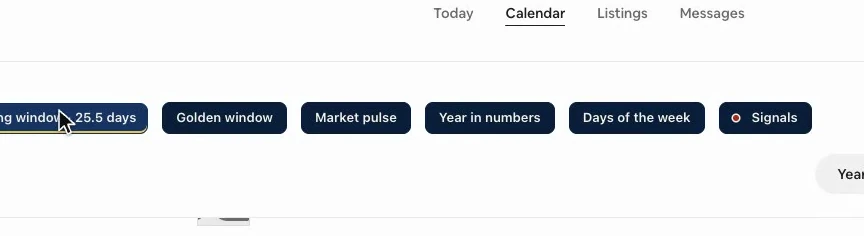
Open your multicalendar on Airbnb in the year view. In the row of extension buttons above the calendar is “Signals”, which only appears in that view. It opens the “Listing signals” panel, and the first thing on its “Status” tab is Booking pace, with two cards: “Pace” and “Last booking”.
The first time, the panel has read nothing yet: it reads when you click “Read the data”, one query at a time, so it does not overload your account (that panel has its own guide). Then the block asks Airbnb for your reservation list; the two cards hold their place while it arrives, and fill in within seconds.
If you are not signed in, or have not accepted the data notice yet, “Signals” asks for that first. Account and settings covers both.
Net nights, by the day they were booked
The big number on “Pace” is net nights: the nights that came in over the last 30 days, minus the nights cancelled in those same days. They count by the day the booking was made, not by the stay: a booking made yesterday for a stay months away already counts, because that is when the demand arrived. A cancellation takes its nights off on the day it happens, even if the booking is older than the window.
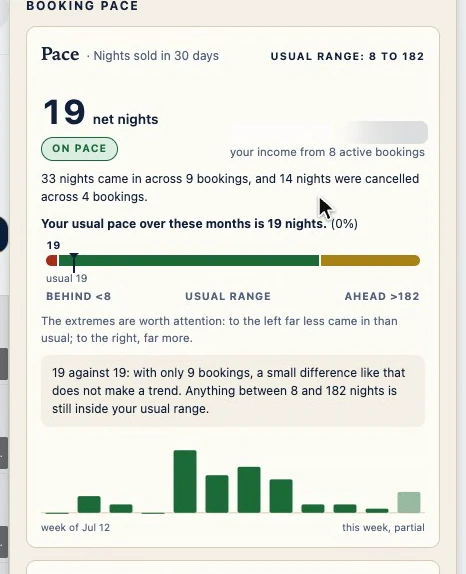
Below, what it is compared against: with 395 days of history, the same 30 days a year ago (“A year ago at this time you sold…”); with seven months, the median of your six previous 30-day windows (“Your usual pace over these months is…”). With less, there is nothing to compare against yet, and the card says so.
On the right, your income from the bookings in this window that are still active. Their stays can fall months from now, so it is not what you collected this month, and it never goes into the comparison.
Your usual range, not a single number
With few bookings a month, a single long stay moves the figure a lot. So the card does not stop at a bare percentage: it gives you your usual range, the values that, with this many bookings, cannot be told apart from your reference. As long as you land in the green zone of the bar, the chip says “On pace”. To the left, it says “Behind”. To the right, “Ahead”, in gold, because selling far more than usual is also worth a look. The sentence under the bar explains the verdict, and twelve small bars show the shape of your last twelve weeks.
Days since your last booking
“Last booking” answers the question that worries you most: how many days since a new booking? It counts from the last day a booking was made that is still standing, not from an arrival. And it compares that wait with your own stretches without bookings: from this same time last year when your list reaches that far and has enough of them there, otherwise from the last 90 days. The card says which.
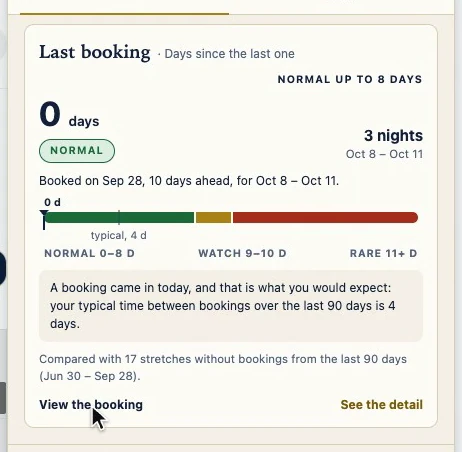
The bar shows how far is normal for you, where rare begins, and what is typical. Normal covers waits no longer than three out of four of your stretches. To call a wait rare, and turn the chip to “Alert”, being longer than nine out of ten of them is not enough: it also has to be more than double your typical time, so it does not go off every month. In between is “Watch”. With fewer than eight stretches, the card says “No history”. “View the booking” opens that booking on Airbnb, in a new tab.
The detail, in one sentence
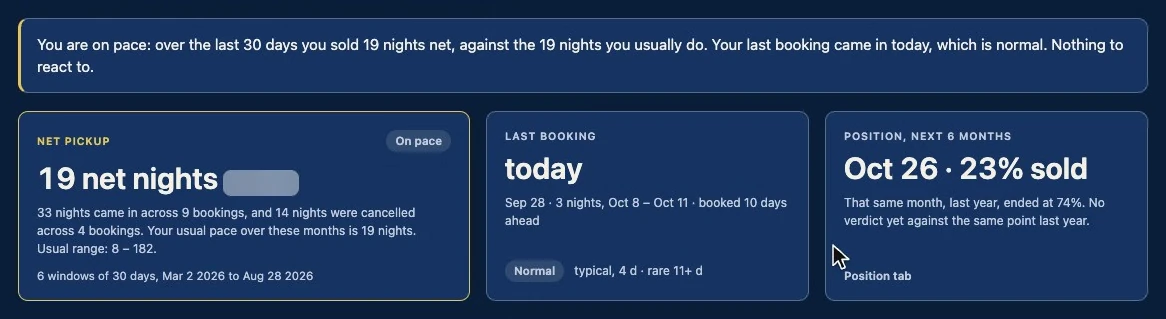
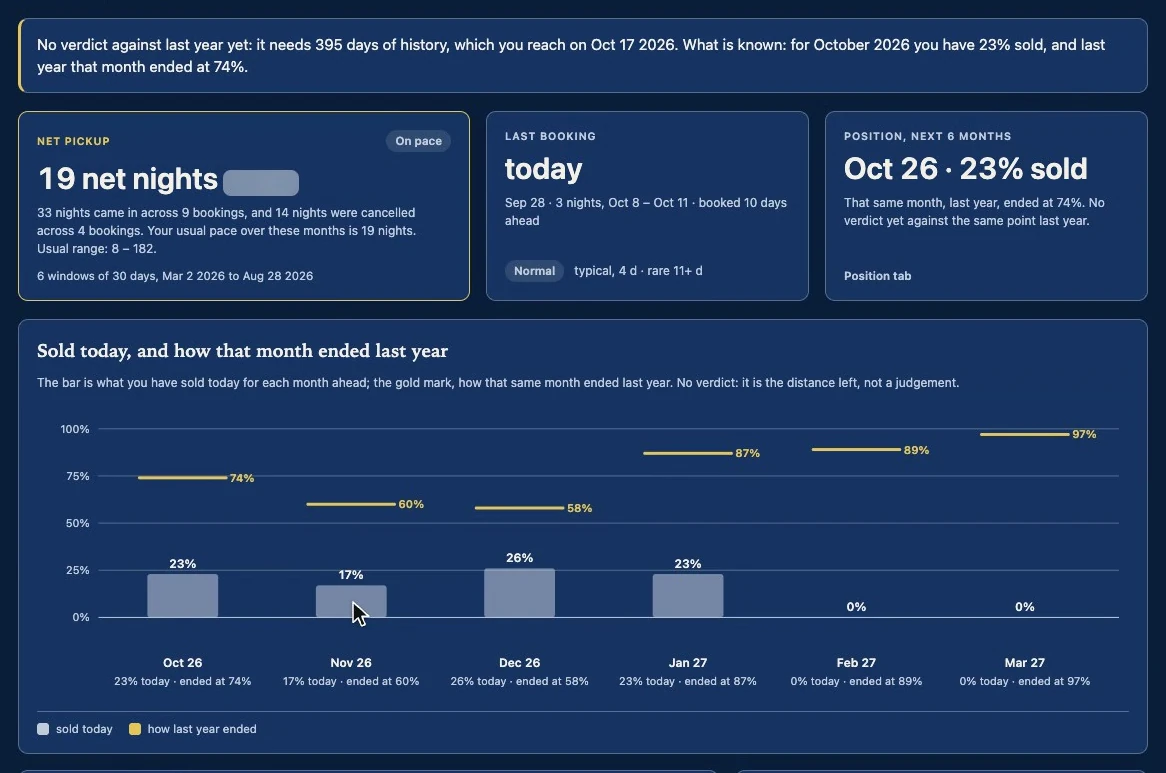
“See the detail” opens the full screen. At the top, the reading in one sentence: what happened, what it means, and whether you need to do anything. When there is a verdict, it ends with “Nothing to react to.”, “Worth keeping an eye on.” or “Worth a look.” Below, the three figures behind it: “Net pickup”, “Last booking” and “Position, next 6 months”.
Twelve weeks, booked and cancelled kept apart
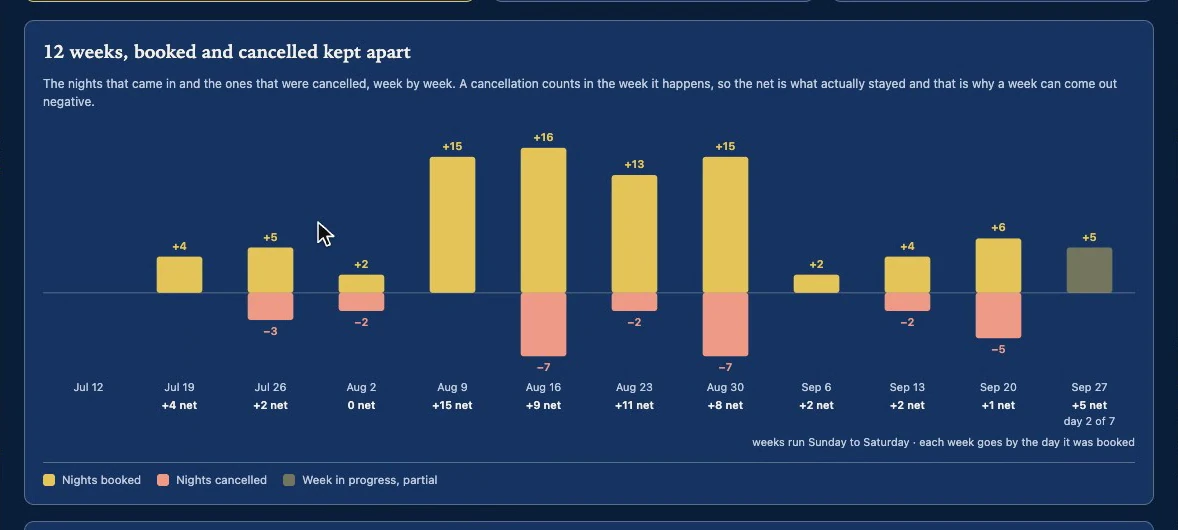
Further down the “Pickup” tab, your last twelve weeks: above the line, what came in; below, what was cancelled; under each date, the net. A cancellation counts in the week it happens, even for a booking made months ago, so a week can come out negative. The week in progress is drawn fainter and says which day it is on, so a week that just started does not look like a collapse. Weeks start on the day used in your country.
Where normal comes from
“Stretches without bookings” shows what “Last booking” compares against. Each peak climbs one day for every day without a new booking, and drops back to zero when one comes in that is still standing. The gold one is the stretch you are in now. A sentence counts them, a list gives the five longest, and the span button with a gold dot is the one the card compares against.
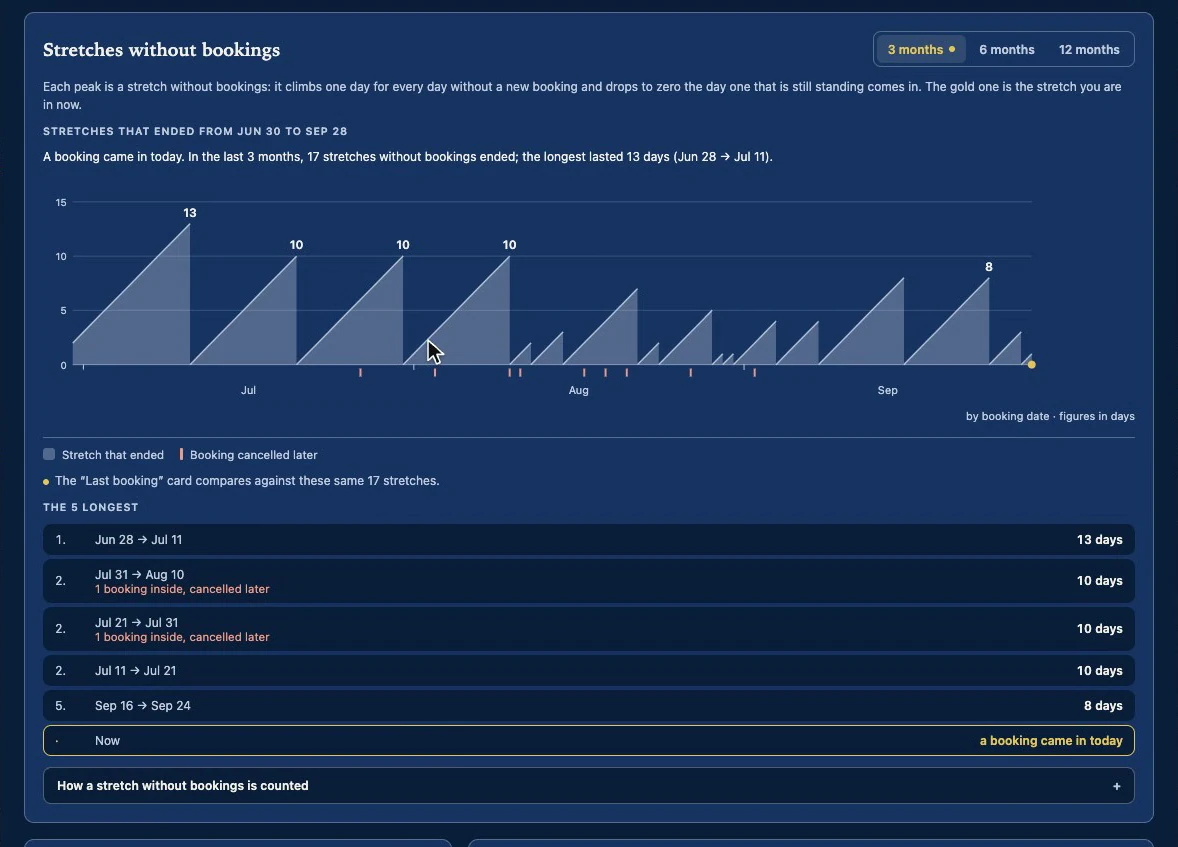
You can switch to 6 or 12 months without asking Airbnb for anything new. A booking cancelled later does not cut a stretch; it is marked in red on the day it was made.
What the new nights are made of
Next, the new nights split by how far ahead they were booked (up to 14 days, 15 to 44, 45 or more) and by stay month, and a table against your history. Only net nights get a range and a verdict. The other rows carry a label: “for information” for bookings, lead time and average stay; “always shown” for cancellations; “not compared” for the money.
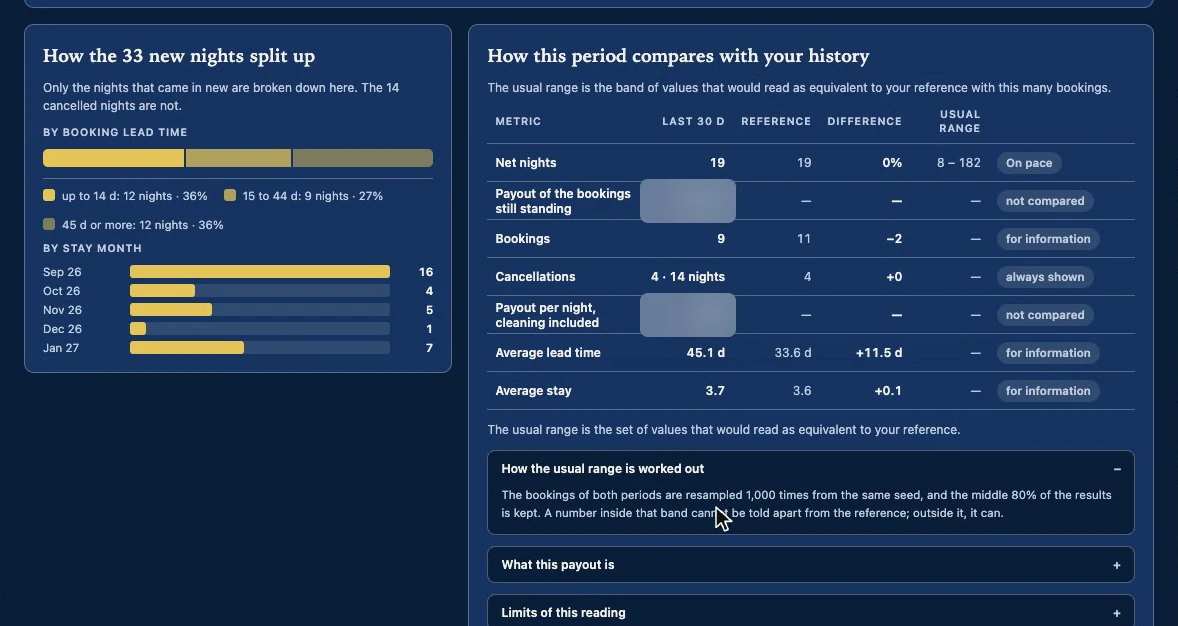
“How the usual range is worked out” says where the range comes from: your bookings are resampled 1,000 times, always from the same seed, and the middle 80% of the results is kept. The same bookings always give the same range.
Position: the months ahead
The “Position” tab looks ahead: for each of the next six months, how much you have sold today against what you had sold for that month at this same point last year. To give a verdict it needs 395 days of history, and it tells you the date your bookings reach them. Until then it does not make one up: it shows what is sold today, and how each month ended last year. It also warns you about a trap: “last year, same point” is not how that month ended; it is what you had sold on that day.
Why it works
It comes from your own reservation list, with the day each booking was made and the day it was cancelled: net nights are counted, not estimated. It compares you with yourself. And the verdict comes from a range, not from a single number.
Its limits
The screen writes the first two itself, under “Limits of this reading”.
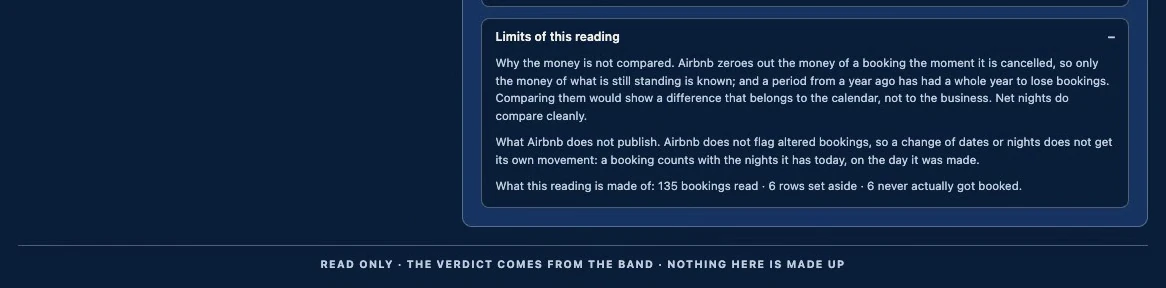
- The money is not compared: Airbnb zeroes out the money of a booking the moment it is cancelled.
- Date changes do not show: Airbnb does not flag altered bookings, so a booking counts with the nights it has today, on the day it was made.
- It does not tell you the cause. For that, look at visibility, clicks and conversion in the Signals panel.
- “On pace” means the figure cannot be told apart from your reference with so few bookings, not that all is well. And the range is your listing’s, not the market’s: the comparison with similar listings is Market pulse.
- It reads your reservations with check-in dates up to 430 days back, forty at a time, up to a page cap. If the list is cut short, the screen says so.