 AI Host Assistant
Docs · Guide 7 of 14
Multicalendar · “Month insight”
Month insight
What each month left you, right under it. Open a month in your calendar and it reads that month and does the math in plain sight: what was paid out minus cleaning, what went unsold, how full it ran, and its funnel.
- Where
- Your Airbnb multicalendar, in month and year view: a “Month insight” strip under each month’s name.
- What it reads
- Only when you open a month: your payout history, that month’s calendar, each reservation’s breakdown and your reviews, plus Airbnb’s comparison with similar listings for the “Market” block. The “Funnel” and “Demand” tabs add your performance dashboard for those dates, the first time you open either of them.
- What it costs
- No AI call. Reads of your own Airbnb data, one month at a time and only for the months you open. A closed month already read is not requested again.
- What it changes on Airbnb
- Nothing. It only reads.
The problem
Your calendar tells you, night by night, what you are asking and what is booked. When the month ends, the question changes: how much did it really leave you? What you were paid is on another page, by payout date, for your whole account, with cleaning included. How many people saw the listing and how many booked, on yet another. And you do the math yourself.
Where to find it
Under each month’s name in your multicalendar there is a navy strip, “Month insight”. It says which phase the month is in, “Closed”, “Running” or “Ahead”, and, on the right, what is still unsold. Every strip starts folded; a click opens it.
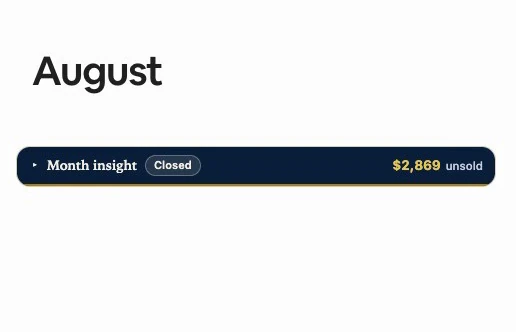
That figure adds up the prices your calendar already shows, so it asks Airbnb for nothing. In the running month and the months ahead it is already without Airbnb’s fee (“unsold, net”); in a closed month you have not opened yet, it is exactly what you were asking. Everything else is read only when you open the month.
Opening a month asks you to be signed in to the extension with Google; the strip’s figure shows without it. Nothing goes to any AI, so there is no AI data notice and no OpenAI key. Account and settings shows how to sign in.
Opening a closed month
Click the strip and the month unfolds right there, without leaving the calendar. The strip’s figure turns net: once opened, the month knows what fee its reservations paid.
The open card has four tabs under the strip: “Money”, “Funnel”, “Market” and “Demand”. It opens on “Money”. The footer is the same on all four: when it was read, the video guide and “Read again”.
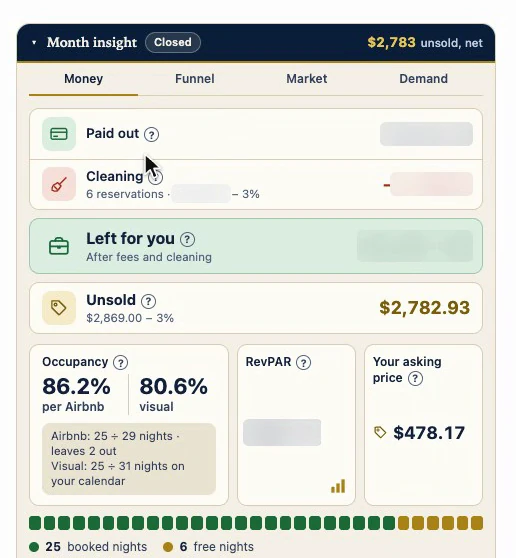
A closed month does not change anymore. Once read in full, it is saved in this browser and not requested again, and the footer says so: “Saved: a closed month does not change.”
The receipt
- “Paid out” is what Airbnb paid you with a date in that month, exactly as your payout history shows it: already without its fee, but with cleaning included.
- “Cleaning” comes off that once, reservation by reservation: what Airbnb charged on each reservation paid out that month, read from its breakdown, minus that same reservation’s fee. The fee goes by the date each one was booked, and the row names it.
- “Left for you” is what remains, and its subline says so: “After fees and cleaning”. Cleaning usually goes to whoever cleans; if you clean yourself, count Airbnb’s total, which the row’s tooltip gives.
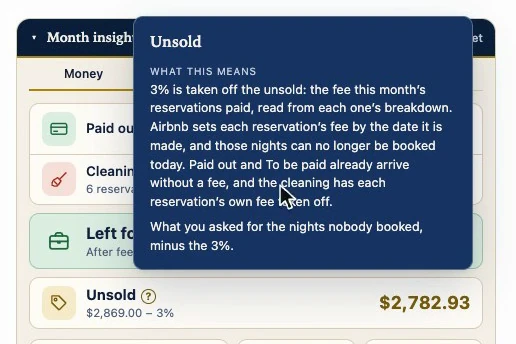
- “Unsold” is what you were asking for the nights nobody booked. They can no longer be booked, so the fee that comes off is the one the month’s own reservations paid, not today’s. If that fee could not be known, the row reads “Unsold (asked)”: what you were asking, as it was.
Each row has a “?” next to its name: hover or click it and a floating card explains that row, without stretching the card. Escape or a click outside closes it.
The nights
Below, on the same tab, three figures meant to be read together. “Occupancy”, with two readings: Airbnb’s first, “per Airbnb”, read from its dashboard, and next to it the “visual” one, booked nights over all the nights in the month, blocked ones included, the one you can check by looking at the calendar. Under them, how many nights each one divides by: Airbnb leaves some nights out, so the two need not match. “RevPAR”: what the booked nights left, cleaning already out, spread over every night in the month, sold or not. A high price says nothing if the month is half empty; this does. And “Your asking price”: the average of the nights still free.
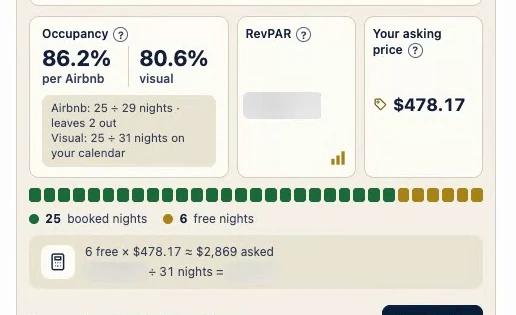
The row below has one cell per night: green for booked, gold for free, gray for blocked, which do not count as a lost sale. Each calculation is written underneath, so you can check it.
The other tabs
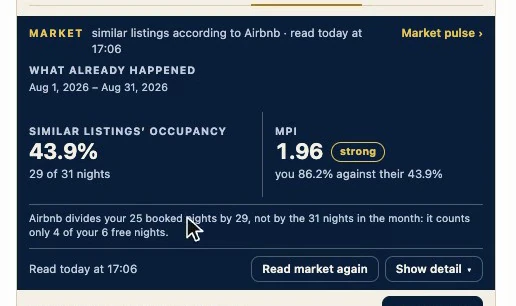
“Market” is your occupancy against similar listings according to Airbnb, which has its own guide, Market pulse. It has buttons of its own, “Show detail” and “Read market again”; those are for the market. Below the figures, a sentence says in words how many nights Airbnb divides your occupancy by.
“Funnel” and “Demand” switch on once the month is read, and the first time you open either of them your performance dashboard is read for those dates, which is what costs more to read.
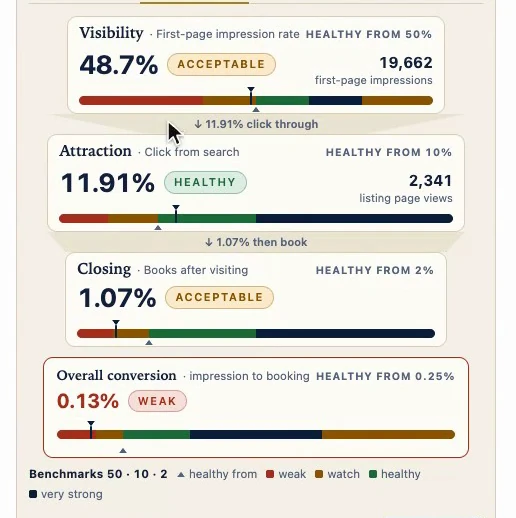
“Funnel” is the month’s funnel, read from your Airbnb performance dashboard for this listing and exactly those dates. Visibility: how often you showed up on the first page of results. Attraction: how many clicked. Closing: how many booked after visiting. Under them, “Overall conversion”, from impression to booking. Each stage shows its band and where healthy begins.
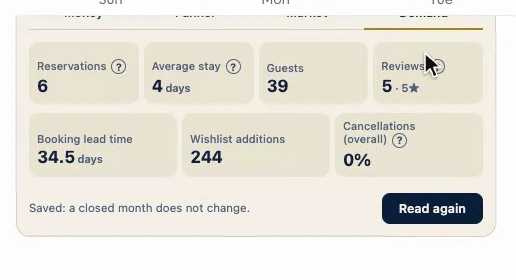
“Demand”: how many reservations checked in that month (a stay that began the month before counts there), this listing’s average stay, how many guests came, and the reviews from guests who checked in that month, even if they wrote later, with their average rating. Only the count and the average, not the reviews.
Below, on the same “Demand” tab, three more signals: how far ahead guests booked, how many saved you to their wishlists, and “Cancellations (overall)”. Careful with that one: it counts cancellations whoever made them, guests included. It is not your Superhost rate.
A month ahead
A month ahead has no result yet, and it does not fake one. It is drawn at full size from the click, with gaps where the figures will go, so the calendar does not jump.
Its receipt is already net. There is no “Paid out”: what is booked shows as “To be paid”, which can drop if someone cancels. What is still unsold is added in, already without the 15.5% Airbnb keeps from a reservation made today. “If every free night sells”, at today’s prices, is not a ceiling: a weekly or monthly discount lowers it.
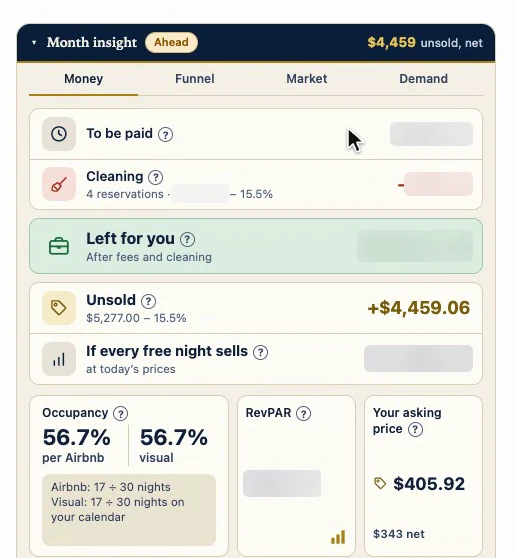
Your asking price shows its net underneath, and RevPAR counts only what is booked so far. Its funnel, for the searches and bookings of those dates, is read page by page, one at a time so as not to overload your account, and each figure appears as it arrives. If you close the card, it stops reading.
The running month
The running month mixes both: what has been paid out so far and what is still to be paid. Unsold counts from today, because nights that have passed cannot be sold; if every free night has already passed, the line says so instead of disappearing. RevPAR warns that it is still rising.
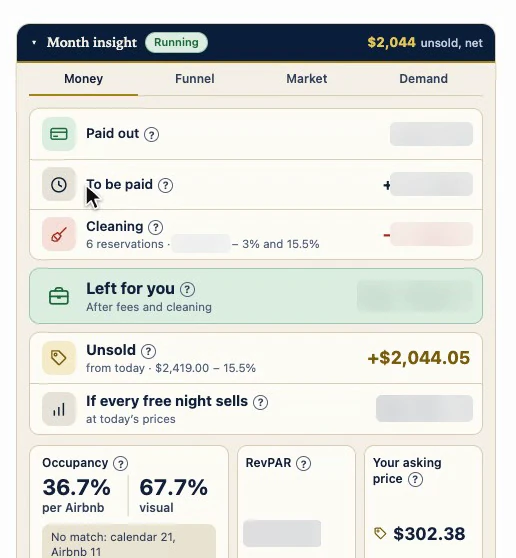
The footer says when it was read. A month still under way is not saved for good: if you come back after a quarter of an hour, it is read again.
Several months at once
You can open several months to compare them side by side; opening one does not close another. Each is read only when you open it, and one at a time. In the year view the strips get narrower: the phase becomes a colored dot, and the figure stays.
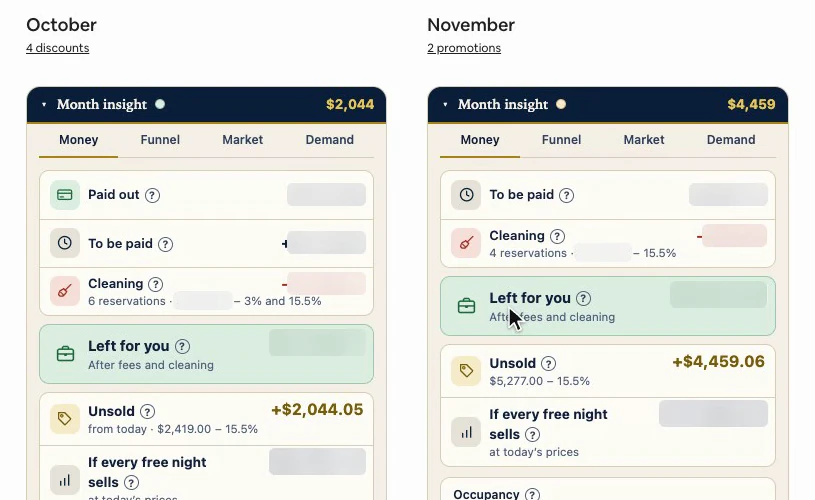
For the whole year at a glance there is Year in numbers, with its own guide.
Why it works
For that month, it reads the same sources as Airbnb and does the math in plain sight, saying what goes into each figure. What it cannot know, it names instead of guessing: a cleaning fee with no breakdown is not taken out, and the row says so; a RevPAR that does not add up says why.
Its limits
- “Paid out” covers your whole account and goes by payout date. With more than one listing, it is not mixed with this one, and the card tells you.
- “Unsold” adds up your nightly prices, without length-of-stay discounts. In the running month and the months ahead, it is what you can still sell, not a loss.
- The funnel’s bands are the extension’s benchmarks, not Airbnb thresholds.
- It only reads. It changes nothing on Airbnb.