 AI Host Assistant
Docs · Guide 9 of 14
Multicalendar, year view · “Days of the week”
Days of the week
Your Mondays, your Fridays: what each day did over the past year. It groups the past nights of your last year by day of the week: which day fills most and least, when guests arrive and leave and, if you ask, which earns most.
- Where
- Your Airbnb multicalendar, in the year view: the “Days of the week” button in the year row.
- What it reads
- Your own calendar, night by night, for the past year, and your reservations list, to know when your listing started taking bookings. Each stay’s breakdown, only if you ask.
- What it costs
- Requests to Airbnb at a gentle pace: your reservations list and one per month of calendar the first time, then only the running month; one per missing stay if you read the amounts. No AI.
- What it changes on Airbnb
- Nothing. It only reads.
The problem
Which nights of the week fill up on their own, and which stay empty? Your calendar shows it square by square. To know, you would have to count every Monday and every Friday of the year and set aside the blocked ones. Even then you would not know what each one brought in: Airbnb gives the amount of each stay, not of each night.
Where to find it
Open your multicalendar in the year view. In the year row, “Days of the week” sits right after “Year in numbers” and before “Signals”.

It is not the same as the button beside it. Year in numbers counts the calendar year month by month, including the months to come. This one looks at the last twelve months by day of the week, and only at nights that have already passed. The panel opens over the page without moving your calendar, and closes with Escape, the × or a click outside it.
It needs you signed in to the extension, but it sends nothing to an AI. Account and settings shows how to sign in.
What it reads, and which year
When you open it, it reads your Airbnb calendar month by month and night by night: which nights were booked, which were open and which were blocked. First it checks when your listing started taking bookings, then the last year. The first time takes a little while. Closed months no longer change, so they are saved in this browser, and next time only the running month is read again.
Below the title and its subtitle, a line says exactly what was counted: weeks, stays, and from which day to which day. Only past nights, up to yesterday and at most twelve months: no forecasts. If your listing is less than a year old, the period starts on the day of its first booking, and the panel says so: the calendar shows the days before as open, and whether they could already be booked is not known.

“Read again” re-reads the running month and whatever could not be read; closed months come from what was saved. If the new reading comes out worse, the previous one stays and the panel says why.
Four cards, each with its sample
First, four cards: “Highest occupancy observed”, “Highest revenue per night offered”, “Highest average price per night sold” and “Lowest occupancy observed”. Each names a day, a figure and, below it, where the figure comes from.
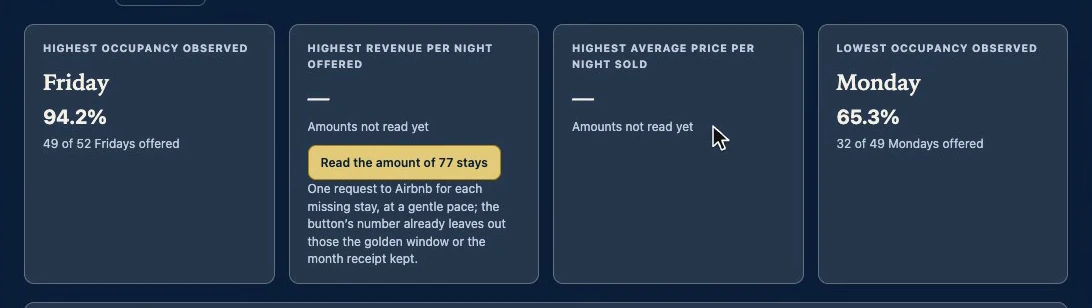
Every figure in the panel has its sample next to it, because a hundred percent out of two Fridays does not weigh the same as ninety percent out of fifty. A tie is shown as a tie. The two money cards say “Amounts not read yet” until you read them.
The seven days, compared
Below, the seven days from Monday to Sunday, each with its occupancy, a bar and its sample. Blocked nights are counted apart, next to the sample: a blocked night counts neither as offered nor as a lost sale. The money columns say how many sold nights are still without an amount, and on the right, how many check-ins and check-outs fell on each day.
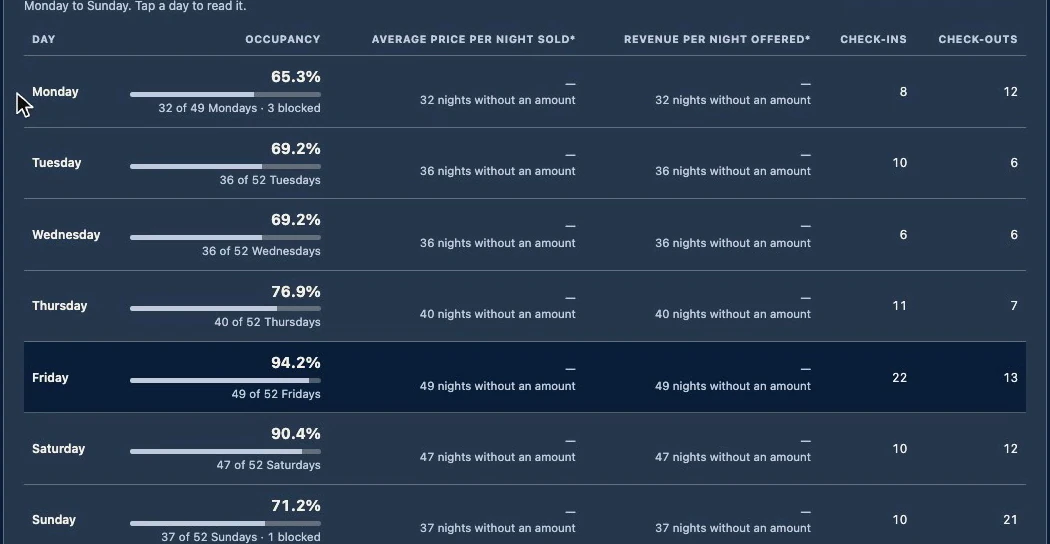
Tap a day and it reads it to you
When the panel opens, a day is already selected: the one with the highest revenue per night offered if there are amounts, otherwise the one with the highest occupancy. Tap another row and “Reading of the selected day” tells it in sentences.

Below it, always the same warning: it is an observed average of what happened under your prices, your rules and your availability. It is not the effect of being a Monday, and it does not say how much to raise or lower your price.
Sorting without making up an order
“Sort by” orders the table by occupancy, either money figure, check-ins or check-outs, and the note above it names the day that comes first. If you sort by money before reading the amounts, it does not make up an order: it says the amounts are missing and keeps the weekly order.

Check-ins and check-outs are not occupancy
Further down, “The rhythm of check-ins and check-outs” names the day with the most check-ins and the day with the most check-outs, each with its count and its share.

But activity is not occupancy. A Friday-to-Sunday stay fills Friday and Saturday, and its check-out counts on Sunday. Many check-outs on a Sunday do not mean that Sunday sells well.
The money, only if you ask for it
The money is not read when the panel opens, because it has a cost: Airbnb only gives each stay’s breakdown, one request per stay. The gold button in the revenue card says how many stays are missing and what that involves. Stays already saved by the Golden window or a month’s receipt in Month insight are not requested again.
Once read, the two money cards name the day that earns most, and they are two different figures on purpose. The average price per night sold looks only at nights that sold. The revenue per night offered spreads what was earned across every night offered, sold or not: it combines price and occupancy in one figure. The two can name different days.
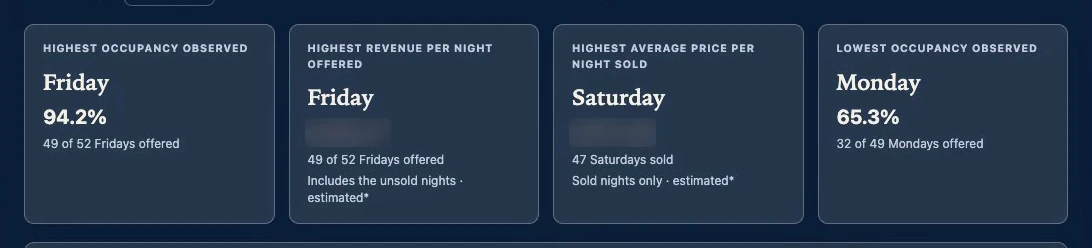
Every money figure carries an asterisk: it is an estimate. It is the stay with its discounts and extras, before Airbnb’s fee and the co-host payout, without cleaning or taxes, spread evenly across the nights of each stay. If a stay will not give its breakdown, the panel says so, and the money cards name no day rather than show a figure that falls short.
How it counts, written in the panel
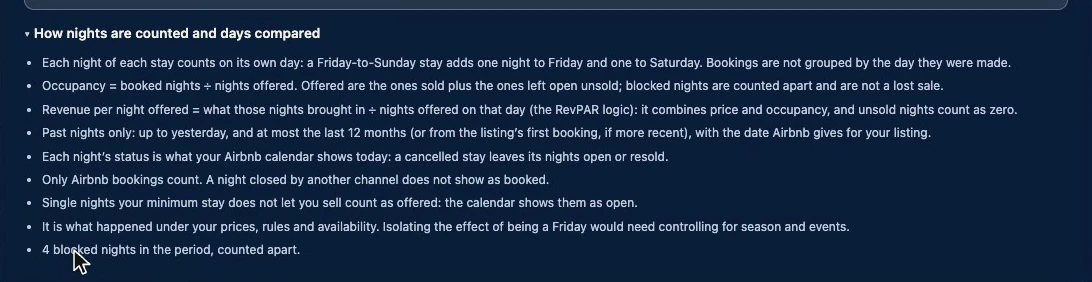
“How nights are counted and days compared” opens the method. Each night counts on its own day, not on the day the booking was made. Occupancy is booked nights divided by nights offered, with blocked nights apart. Nothing is filled in: what could not be read does not count, and the panel says so.
Why it works
It counts from your own calendar, night by night, and puts each figure next to its sample. It keeps blocked nights apart from unsold ones and activity apart from occupancy, and writes down how every number was made.
Its limits
- Only Airbnb bookings count. A night closed by another channel does not show as booked.
- A cancelled stay leaves its nights as your calendar shows them today.
- Single nights your minimum stay does not let you sell count as offered.
- It is what happened, not why. Isolating the effect of being a Friday would need controlling for season and events.
- The money is an estimate, spread evenly across the nights of each stay.
- It looks only at your listing’s past. The market is in Market pulse.