 AI Host Assistant
Docs · Guide 2 of 14
Inbox · “Guest screening”
Guest screening
Who they are and how they have behaved, without leaving the thread. It brings the guest’s public profile into the conversation, checks whether they review their hosts back, and offers an AI reading of their record with a light the model does not choose.
- Where
- Your Airbnb inbox, in the reservation column, right under the guest’s name: the “Guest screening” strip.
- What it reads
- The guest’s public Airbnb profile, and the conversation already on your screen. With “Check it”, also the reviews received by the hosts who reviewed them.
- What it costs
- One request to Airbnb when you first open it, a few more if they have many reviews. “Check it” is about a dozen reads. “Evaluate with AI” is one AI call with your OpenAI key.
- What it changes on Airbnb
- Nothing. It only reads.
The problem
Someone who is going to sleep in your home writes to you. Before you reply, you want to know who they are and how they have behaved in other homes. That is on their Airbnb profile, on another page, one review at a time. And two things are not there either: whether they leave reviews for their hosts, and what rating those hosts gave them.
Where to find it
Open a conversation in your inbox. In the reservation column, right under the guest’s name, there is a folded strip: “Guest screening”. The whole header is the button.
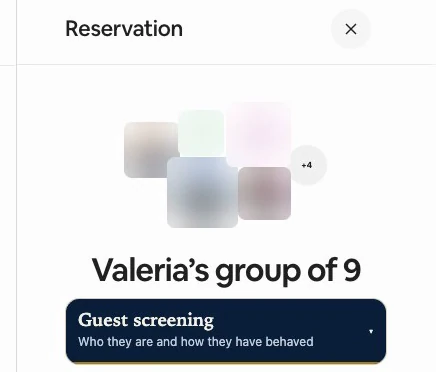
Folded, it asks Airbnb for nothing: who the guest is comes from the link on their photo, already on the page.
Opening it is asking for it
The first time you open it with a guest, it reads their profile: one request to Airbnb, and a few more if they have many reviews. After that it is saved. The footer says what it is: read only, public profile data.
At the top, the white “Read again” asks for the profile again, and the gold “Evaluate with AI” asks for an AI reading. In this extension, gold marks what costs something.
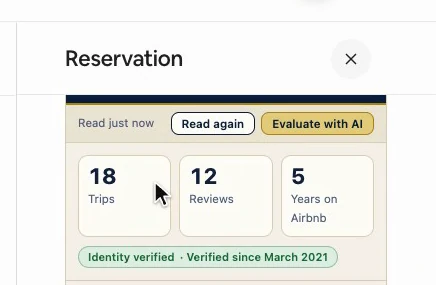
First, what Airbnb shows on their card: trips, reviews and years on Airbnb. A missing number gets no box, never a zero. Below, their identity, with three answers: “Identity verified”, “Identity not verified” or “We could not check their verification”, which is our reading failing, not a fact about the person.
If Airbnb says they are not verified, a red “Identity not verified” warning comes up at the top, with no AI call: a requirement you can ask of every guest equally, not a judgment about this person.
What their hosts wrote
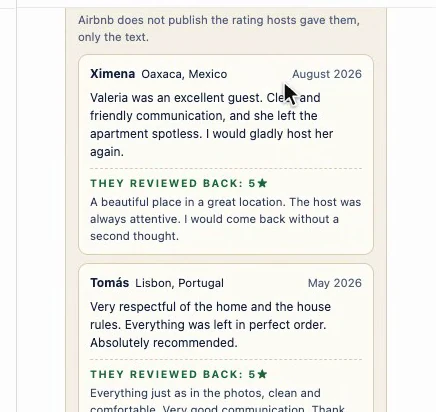
Next, what their hosts wrote about this person, in full, with who and when. Before the cards, a note: Airbnb does not publish the rating hosts gave them, only the text.
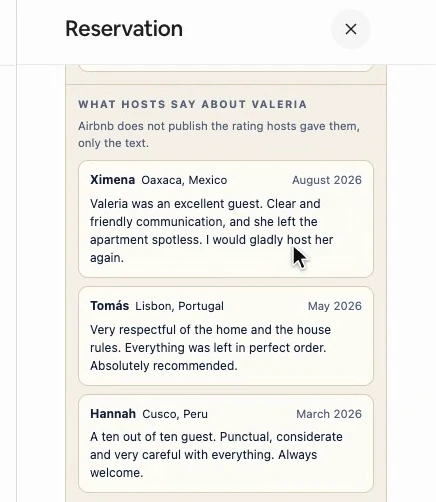
Three are showing, and “See all” opens the rest, already read when you opened the strip. A review from a group trip says so, because it may not be about this person.
What they say about themselves, and your conversation
Further down, what this person put on their profile: their answers, their interests and where they have been with Airbnb. This, like their verification date, comes exactly as Airbnb gives it: with the extension in Spanish, its labels stay in English.
At the end, “Your conversation”: just how many messages there are and the time of the last one. It comes from the page you have open, with no request to Airbnb, and you already have the text beside it.

The AI reading
“Evaluate with AI” uses your own OpenAI key. A model reads what was already saved, without going back to Airbnb: their profile, up to 20 reviews from their hosts, the reviews this person left if you checked, and up to the last 20 messages of this conversation.
The reading goes at the top of the strip, and the first thing it says is how much evidence there is: “A long record”, “A partial record” or “Almost no record”. Each signal carries its label, “In their favor”, “Watch” or “Context”, and has to name the piece of data it rests on. If it quotes, the quote has to be word for word in what was read. If not, it is dropped, and the panel says how many.
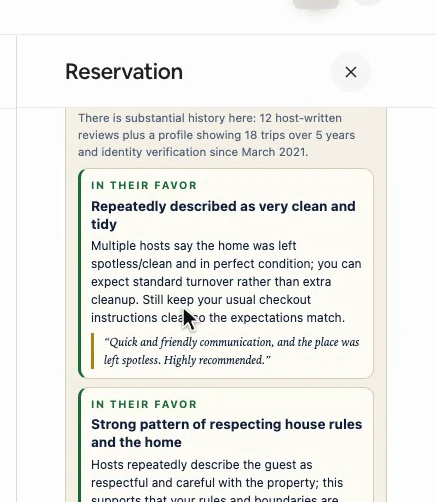
The messages are fenced: the model is asked to use them only for “What you can do”, and no signal can rest on them or quote them. It is one call, retried once if something passing fails, and the answer is saved with the profile.
The light
At the top, the light, with a shape as well as a color: a red square, an amber triangle, a green circle, or hollow and gray when there is no basis. The model does not choose the color. Fixed rules set it from what got through the filter.
Apart from an unverified identity, the only thing that moves it is a “Watch” signal quoting, word for word, what a past host wrote about this person. One host gives amber; red takes two different hosts. Having no reviews gives gray. If what is flagged is a wheelchair, a pregnancy, children or a religion, you see it, but it does not move the color.
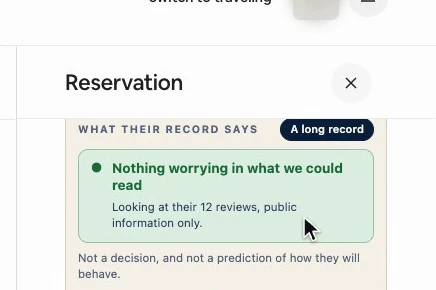
Green reads “Nothing worrying in what we could read”, and says what it covers; gray says why. Below it, always: “Not a decision, and not a prediction of how they will behave.” Then “What you can do”, “What this record does not say” and, at the bottom, how many messages it was written with.
Do they leave reviews?
Airbnb does not publish the reviews someone writes. The gold “Check it” button rebuilds the answer from what Airbnb does publish: it goes to the hosts who reviewed this person and looks for a review back among the reviews those hosts received.
Only their five most recent stays, and with each host, only back to a month and a half before that host’s review. It matches by account, not by name, and goes slowly, one read after another. A stay it could not check is shown apart, in amber, and does not count as a no.
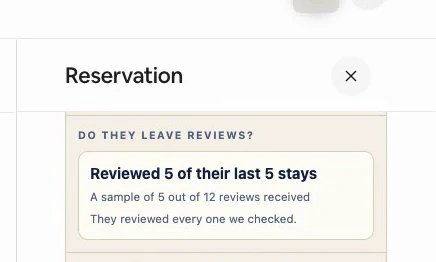
The result is a sample, not a percentage: how many they reviewed out of the stays that could be checked, and how many reviews the sample is drawn from. Where their review was found, it appears under the host’s: “They reviewed back”.
New data, gray light
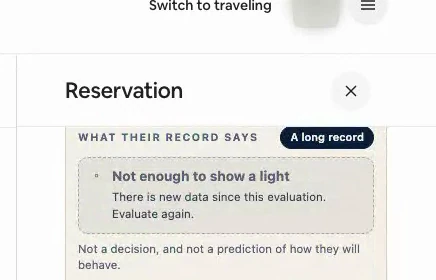
If you evaluate first and check afterwards, the AI reading never saw the check, and the panel does not accept it: the light turns gray and says there is new data. It does not redo it on its own, because it costs a call. “Evaluate again” makes a new reading that includes what was just found.
Another thread, and what stays saved
If you switch conversations, the strip is removed and comes back folded for the new person, so one guest’s reviews do not stay under another’s name. What was read is saved per person, in this browser: it is there at once when you come back, with no request, and it does not expire. “Read again” requests it again, redoes the check if there was one, and throws out the AI reading, which was about the old data.
If you then reply with the reply drafter, this screening serves as context, without being quoted to the guest.
If you are not signed in to the extension, or have not accepted the data notice yet, opening the strip asks for that first. The AI reading also needs your OpenAI key in the extension’s options. Account and settings covers all three.
Why it works
It brings what is already public into the conversation, reads it once and saves it. What Airbnb does not publish, it rebuilds from what it does, and calls it a sample. Every AI signal needs support, and rules set the color.
Its limits
- The check looks at five stays at most, and the AI reading at the twenty most recent host reviews.
- The filter checks the signals. The summary and the advice are the model’s own wording.
- Nothing updates on its own, and past 150 guests the oldest saved ones are removed.
- It reads one profile, the one behind the first photo in the reservation’s header, not every member of the group.
- It does not decide for you.