 AI Host Assistant
Docs · Guide 5 of 14
Multicalendar · under each price, and “What you get”
Net after 15.5%
What each night really leaves you. Under the price of every night you can still sell, what is left after Airbnb’s 15.5%; and when you select nights, the full math of that possible booking.
- Where
- Your Airbnb multicalendar: a second line under each price and, when you select nights, the “What you get” card in Airbnb’s side panel.
- What it reads
- The prices already on your calendar and the nights you select. For the card, also your cleaning fees, length-of-stay discounts and active promotions, from your listing’s pricing settings.
- What it costs
- No AI call. The labels only read the screen. The card reads a listing’s pricing settings the first time you select nights on it, and keeps them while you stay on the calendar.
- What it changes on Airbnb
- Nothing. It only reads.
The problem
Today, when a new booking comes in, Airbnb keeps 15.5% of the total: of the nights, and of the cleaning fee too. But your calendar still shows what you ask, not what reaches you. Doing that subtraction in your head, night by night, while you adjust prices, is slow and easy to get wrong: the fee also applies to cleaning, a weekly or monthly discount only comes off the nights, and your promotions are already inside each night’s price.
Where to find it
Open your multicalendar on Airbnb. There is nothing to click: under the price of each night you can still sell, there is now a second, smaller line with what that night leaves you. The “What you get” card appears when you select nights, the way you always do in Airbnb.
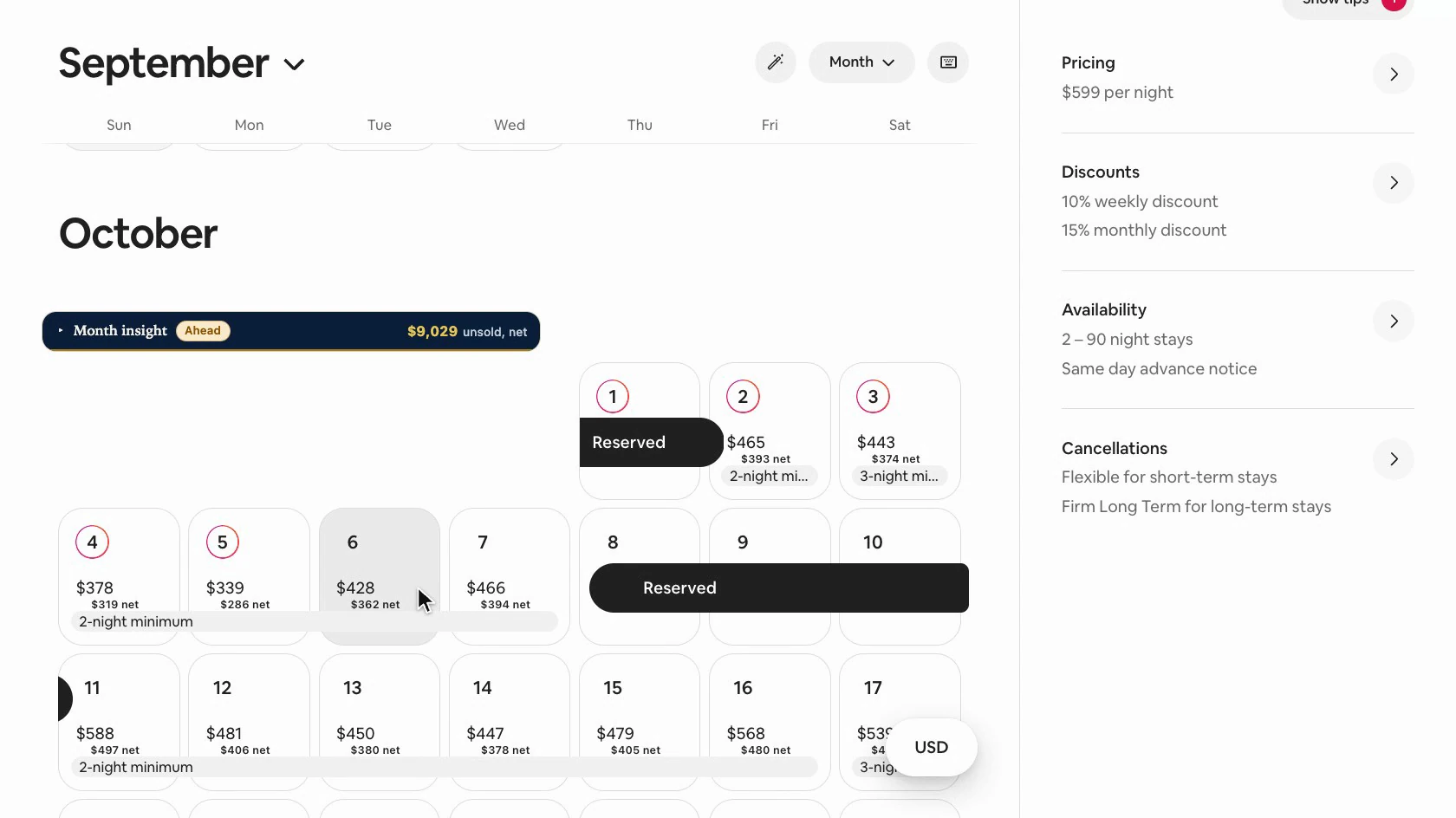
The dark strip at the top of each month is “Month insight”, a different tool, with its own guide.
The label under each price
Each label is that night’s price minus 15.5%. The fee is worked out to the cent, and what is left is rounded once to whole units, the way Airbnb writes its prices, in the page’s currency.
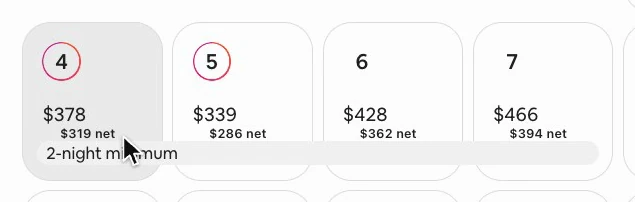
It takes up no space: it hangs under the price without adding any height, so the calendar does not move a single pixel. On a night you select, it takes the colors Airbnb gives that cell, so it stays readable.
Where there is no label
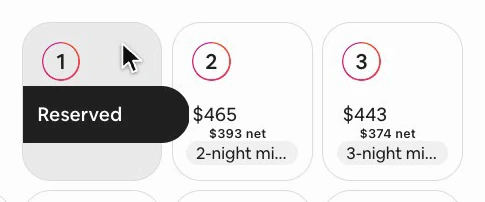
Booked nights do not get one: they no longer show a price, and the money from those bookings is counted by Month insight. Neither do blocked nights, for the same reason.
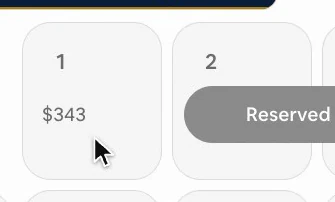
Nor do nights that have already passed. They can no longer be booked, and this 15.5% is what Airbnb keeps from a booking made today: the fee depends on the day a booking is made, not on the dates of its nights.
“What you get”, for the nights you select
If someone booked a few particular nights, how much would reach you? Select them on the calendar. In its side panel, Airbnb shows its price per night. Right below it, the extension’s card appears, in its own colors, so you can tell its estimate apart from Airbnb’s figures.
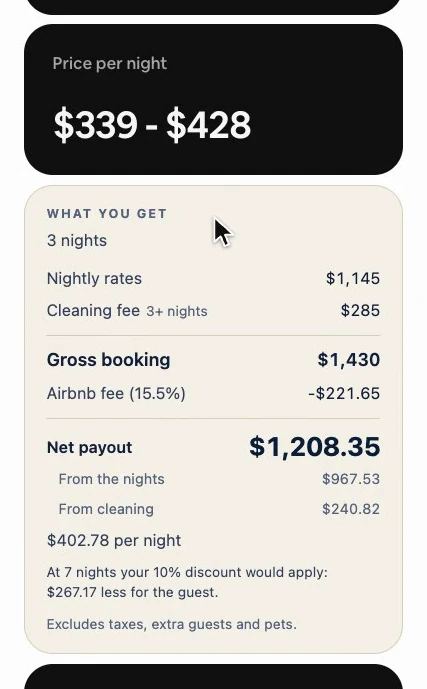
The card looks up your cleaning fee and your length-of-stay discounts, and does the math as soon as they arrive. Until then it shows the nights and what you ask for them, and leaves the rest blank, saying it is looking them up.
The labels need no sign-in. The card shows its figures only when you are signed in to the extension; otherwise it says “Sign in to see the net for this selection.”, with a “Sign in” button. Account and settings shows how signing in works.
The math, row by row
- First, how many nights you selected.
- “Nightly rates” is the sum of what you ask for each one.
- “Cleaning fee” is the fee set in your listing, and it says which one it used: “3+ nights” or “short stay”.
- “Gross booking” is the nights, minus a length-of-stay discount if one applies, plus cleaning.
- “Airbnb fee (15.5%)” comes off that whole total, cleaning included.
- “Net payout” is what is left: the big number.
- “From the nights” and “From cleaning” show where that money comes from, each one already without its share of the fee. If you pay someone to clean, the line that is really yours is the one from the nights.
- At the end, your payout spread across the nights, cleaning included: the number for comparing a three-night booking with a five-night one.
You can check it with a calculator
Without a length-of-stay discount, the labels of the nights you selected add up to “From the nights”, give or take the rounding of each label.
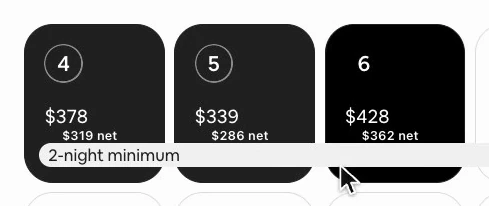
And “From the nights” plus “From cleaning” come to exactly your net payout, to the cent: the cleaning part is worked out by subtraction, so the two always add up.
If your listing has a length-of-stay discount the selection does not reach yet, a note tells you from how many nights it would apply, and how much less the guest would pay for a stay that long, at the average price of the nights you picked. It is a figure to help you decide, nothing more.
Only for consecutive nights
The math only appears for consecutive nights. Take the middle one out of three: at the top of Airbnb’s panel, the range of dates turns into a count of nights, and the card explains that this way it is not one booking.
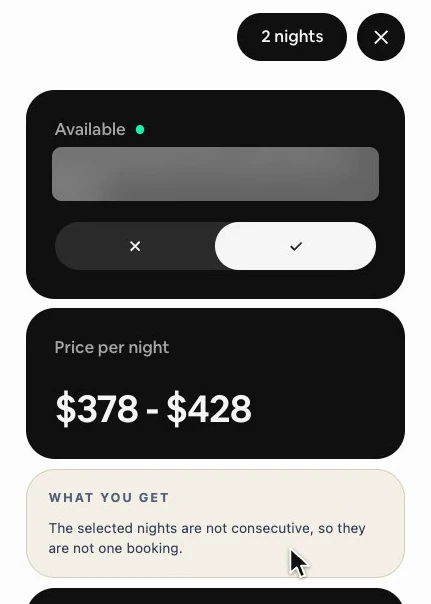
The same goes if one of the nights is booked or blocked, or if the selection reaches the edge of what the calendar has on screen: instead of a total that falls short, the card tells you why there is none. For the edge, it asks you to scroll until every selected night is visible.
Two nights: the other cleaning fee
Airbnb lets you set two cleaning fees: one for stays under three nights, and another for the rest. With two nights selected, the cleaning fee row says “short stay”, and the card uses that fee.
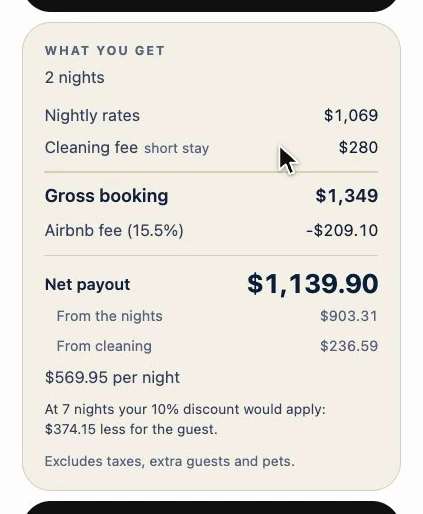
If you only have one of the two set, the card uses the one you have and says so, instead of putting a zero as if it knew. If it could not read your cleaning fee at all, it says the total goes without it.
Seven nights: the length-of-stay discount
If your listing has a weekly discount, seven nights in a row bring a new line: “Length-of-stay discount”, weekly, from 7 nights. It comes off the nights only; the cleaning fee is charged in full. And only one applies, the longest tier the booking reaches: weekly from 7 nights, monthly from 28. Stacking both would be discounting twice. Below, the note already points to the next tier.
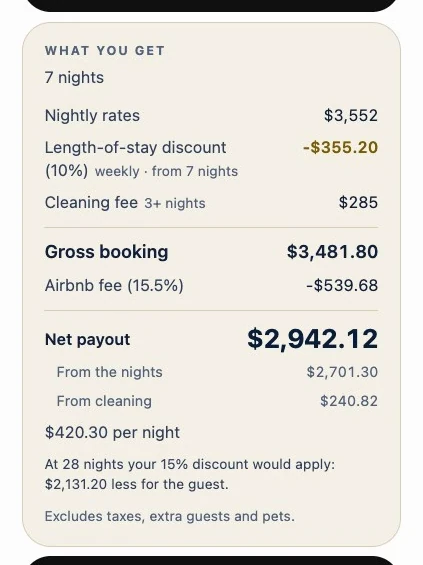
Promotions are not subtracted again: each cell’s price already comes discounted, and when a promotion covers every night you selected, the card says so. A length-of-stay discount the extension could not read is named too: the card says it is not in this total.
Why it works
The math comes from what is already in front of you: the nights you marked and each cell’s price, which already includes your promotions and your date-based rules. Your cleaning fees and discounts are read from your listing’s settings; it does not ask you for them. One fee on the total and every step on screen, so every row can be checked by hand. When it cannot give an honest number, it says why.
Its limits
- It excludes taxes, extra guests and pets, and the card says so at its foot.
- The 15.5% is fixed in the extension: it is not read from your account.
- It is math for deciding prices, not the payout Airbnb will send you.
- Booked and past nights get no label and are not counted. The money from your bookings is in Month insight.